File Storage
Your projects, on file.
Scan or upload your receipts, paperwork, and material lists, and keep them with your other job site info.
Book a Demo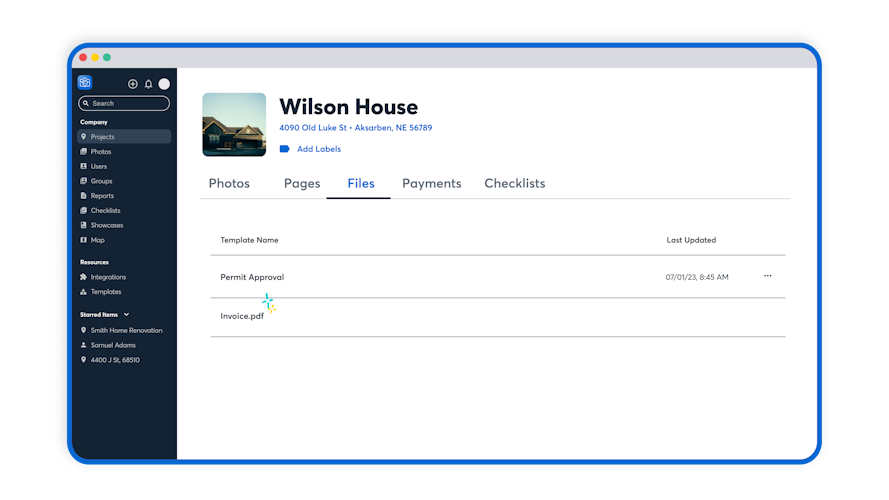

Store Everything Together
Upload your files directly to the corresponding CompanyCam project, so relevant docs are within reach of the job photos, videos, and convos.

Get Organized Automatically
Each job comes with its own set of files—work orders, material lists, and more. Organize them under the Documents tab within the project so nothing gets lost.

Save Files as Templates
Upload the standard work orders, change orders, or other docs your team needs on every job for quick and easy access.

Collect Signatures in the Field
With Signatures, you can upload your files, request and gather the signatures you need in the field, and store it all in one place.
Signatures
Request, track, and gather signatures—without ever leaving the CompanyCam app (or the job site). Protect your business from liabilities with secure signatures on contracts, estimates, and schedules—so you always have proof of approval.
Manage Paperwork like a Pro
Study up on how to get the most out of your documents!
What Else Can I Do?
Explore more CompanyCam features.
In-App Communication
Payments & Invoicing
Checklists are an incredible tool for documenting steps, capturing detailed info, and following processes. But sometimes you need to jot down a one-off task, give yourself a reminder without setting up a whole checklist, or throw a few punch list items somewhere where the whole team will see them. That’s where Project Tasks come in! Tasks can be added directly to a project, photo, or video— it’s extra simple to add to-dos for any situation.
See File Uploading in Action
We know better than anyone that seeing is believing.